Raw reads analysis pipeline
The MGnify v6.0 raw-reads analysis pipeline (GitHub repository) analyses whole genome sequencing (WGS) reads, profiling their taxonomy and functions. It is designed to handle both short (paired- and single-end) and long reads, taking raw reads rather than assembled contigs or genomes as input.
Results available on MGnify
For each analysed run, MGnify displays and provides downloads for:
- Quality-control and decontamination summaries.
- Taxonomic profiles from mOTUs3, SILVA SSU, and SILVA LSU, with interactive Krona visualisations where available.
Natively, the pipeline also produces Pfam-A functional profiles, including read-count tables and mapping statistics. As this requires a high amount of resources and doesn’t guarantee a good recall compared to its assembly-analysis counterpart, this functionality is turned off by default in MGnify. If you have any questions, contact our helpdesk.
Study-level pages aggregate quality-control and analysis-status information across runs where multiple runs are available.
Features
The raw reads analysis pipeline v6.0 provides the following key features:
- Whole-genome sequencing (WGS) read analysis for short paired-end and single-end reads, as well as long reads from Oxford Nanopore and PacBio platforms
- Read quality control using BBMap for paired-end standardisation and fastp for trimming, filtering, and paired-end read merging
- Host and phiX decontamination using bwa-mem2 for short reads and minimap2 for long reads
- rRNA-based taxonomic profiling using Infernal to extract rRNA sequences and MAPseq to map them to SILVA reference databases
- Comprehensive taxonomic profiling with mOTUs (a marker-gene based method)
- Optional functional profiling by mapping reads to Pfam-A Hidden Markov Models with HMMER (turned off by default)
- Chunked processing and optional subsampling for reliable and efficient analysis of large datasets
- Quality-control, decontamination, and run-status summaries through MultiQC, with interactive taxonomic visualisations generated by Krona
Technical details and results reference
The following sections describe the pipeline implementation and its downloadable output files. You do not need to run Nextflow or use these files to view results on MGnify.
Schema
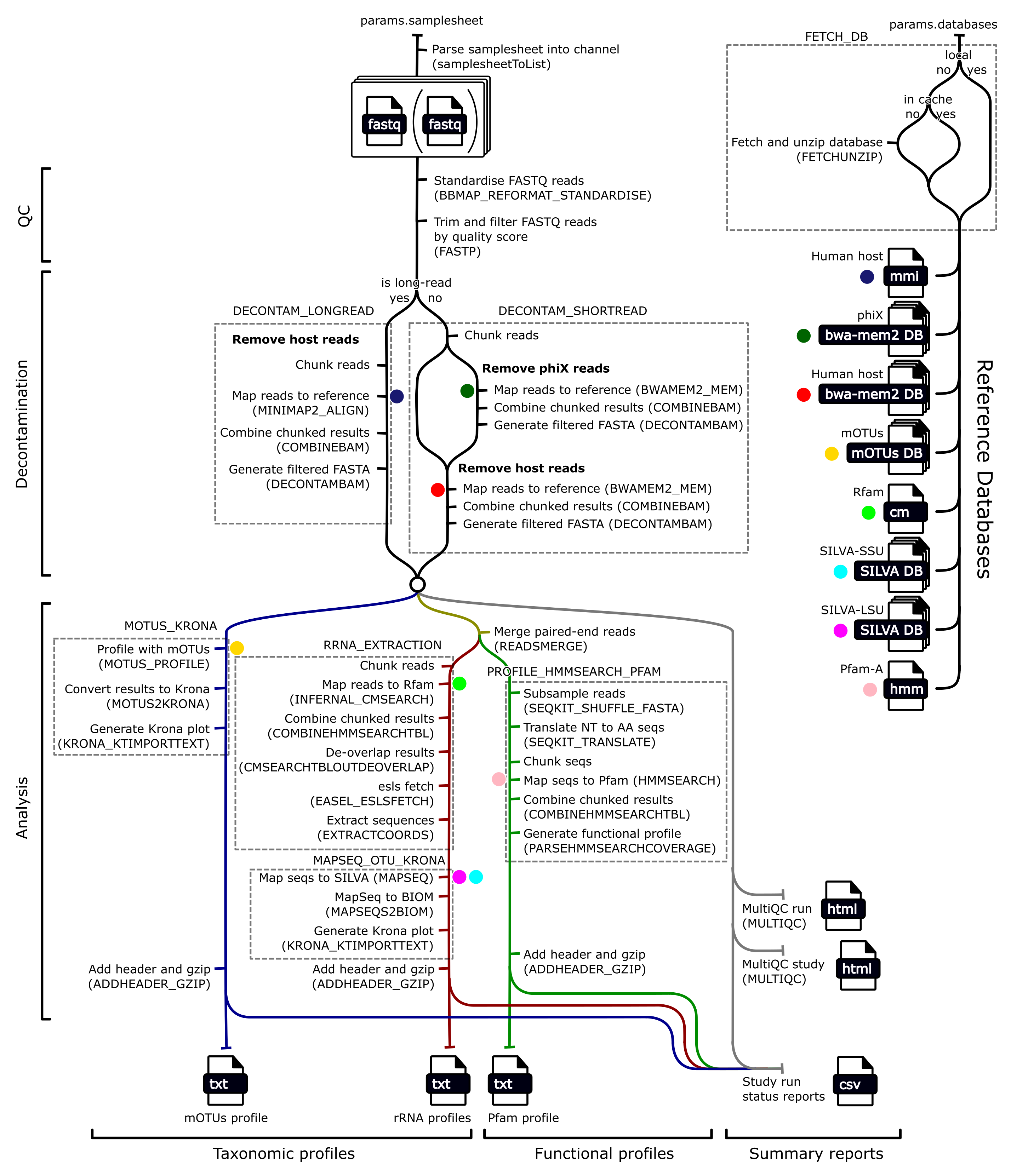
Tools
| Tool | Version | Purpose |
|---|---|---|
| BBMap | 35.85 | Standardise paired-end fastq files |
| fastp | 0.24.0 | Quality control reads, and merging paired-end reads |
| seqtk | 1.3-r106 | Converting FASTQ to FASTA |
| seqkit | 2.9.0 | Translating nucleotide to amino acid sequences, and randomly subsampling sequence files |
| bwa-mem2 | 2.2.1 | Map short reads to decontamination reference genomes |
| minimap2 | 2.29 | Map long reads to decontamination reference genomes |
| samtools | 1.21 | Filter fasta/fastq files for decontamination, and generate summary statistics |
| Infernal | 1.1.5 | Mapping reads to rRNA covariance models using cmsearch |
| easel | 0.49 | Extracting sequences from cmsearch mapping |
| MAPseq | 2.1.1b | Mapping rRNA reads to a reference database |
| Krona | 2.8.1 | Generate interactive taxonomic profiles |
| mOTUs | 3.0.3 | Generate taxonomic profile |
| HMMER | 3.4 | Map reads to hidden markov models (HMMs) (i.e. Pfam-A) using hmmsearch |
| MultiQC | 1.27 | Generating reports containing QC and decontamination information |
| Nextflow | 24.10.2 | Running the pipeline |
| Python | 3.11.8 | Generating functional profiles |
| cmsearch_tblout_deoverlap | 0.09 | Resolve reads mapping to multiple locations of rRNA covariance model |
| mgnify-pipelines-toolkit | 1.0.4 | Contains mapseq2biom for converting MAPseq output to a BIOM taxonomic profile, and provides a known environment for executing various other commands |
Reference databases
| Reference Database | Version | Purpose |
|---|---|---|
| mOTUs | 3.0.3 | Database for mOTUs tools |
| Rfam | 15.0 | Ribosomal covariance models |
| Pfam | 38.0 | Protein hidden markov models (HMMs) |
| SILVA | 138.1 | SSU and LSU rRNA database with taxonomy |
| hg38 | GRCh38.p14 | Human host reference genome for decontaminations |
| phiX | phiX174 | DNA sometimes introduced by Illumina sequencing platforms to be removed in decontamination |
Output files
There are three categories of output files, each with its own directory. Each successful run should have all three directories:
├── qc
├── taxonomy-summary
└── function-summary
Since these results are per-run, many of the output files use the run ID as a prefix. For the purposes of this documentation we will use the run ID ERR12345.
qc
The qc directory contains output files related to the quality control (QC) and decontamination steps of the pipeline. A fastp report is generated for QC and after decontamination, and these are combined in a multiqc report. The fastp reports are json files containing a summary of the fastp run, including the number of reads and/or bases that were filtered for various reasons.
qc
├── ERR12345_qc.fastp.json
├── ERR12345_decontamination.fastp.json
└── ERR12345_multiqc_report.html
taxonomy-summary
The taxonomy-summary directory contains files related to taxonomic profiling of the run. It contains three subdirectories each corresponding to a taxonomic profiling method: * motus: generated by mOTUs3 * silva-lsu: generated by Infernal cmsearch extraction of rRNA sequences followed by MAPseq mapping to a SILVA rRNA LSU reference database. * silva-ssu similar to above but mapped to a rRNA SSU (i.e. 16S) reference database
Each subdirectory contains: 1. a standardised text file reporting read counts of each taxon 2. an interactive Krona plot
Output files: * ERR12345_motus.txt.gz: This text file contains a tab-separated table of read counts for each taxon detected, at various taxonomic levels. It is also the Krona text input that is used to generate the Krona HTML file. * ERR12345_motus.html: This html file contains the Krona HTML file that interactively displays the distribution of the different taxonomic assignments. * ERR12345_silva-lsu.txt.gz: This text file contains a tab-separated table of read counts for each taxon detected, at various taxonomic levels. It is also the Krona text input that is used to generate the Krona HTML file. * ERR12345_silva-lsu.html: This html file contains the Krona HTML file that interactively displays the distribution of the different taxonomic assignments. * ERR12345_silva-ssu.txt.gz: This text file contains a tab-separated table of read counts for each taxon detected, at various taxonomic levels. It is also the Krona text input that is used to generate the Krona HTML file. * ERR12345_silva-ssu.html: This html file contains the Krona HTML file that interactively displays the distribution of the different taxonomic assignments.
taxonomy-summary
├── motus
│   ├── ERR12345_motus.txt.gz
│   └── ERR12345_motus.html
├── silva-lsu
│   ├── ERR12345_silva-lsu.txt.gz
│   └── ERR12345_silva-lsu.html
└── silva-ssu
    ├── ERR12345_silva-ssu.txt.gz
    └── ERR12345_silva-ssu.html
function-summary
When the functional annotation option is turned on, the function-summary directory contains files related to functional profiling of the run. It contains one subdirectory, pfam, corresponding to the one functional profiling method implemented based on hmmsearch mapping to the Pfam-A reference database.
Output files: * ERR12345_pfam.txt.gz: This text file contains a tab-separated table of read counts for each detected Pfam-A profile (or “function”). * ERR12345_pfam.stats.json: This json file summarises the number of reads mapped to Pfam, the number of Pfam models with hits, and the total number of hits across all Pfam models.
function-summary
└── pfam
    ├── ERR12345_pfam.txt.gz
    └── ERR12345_pfam.stats.json
See the raw-reads analysis pipeline repository for detailed pipeline documentation.
Citation
@online{2026,
  author = {, MGnify},
  title = {Raw Reads Analysis Pipeline},
  date = {2026-11-04},
  url = {https://docs.mgnify.org/src/docs/analysis/version6/raw-reads.html},
  langid = {en}
}